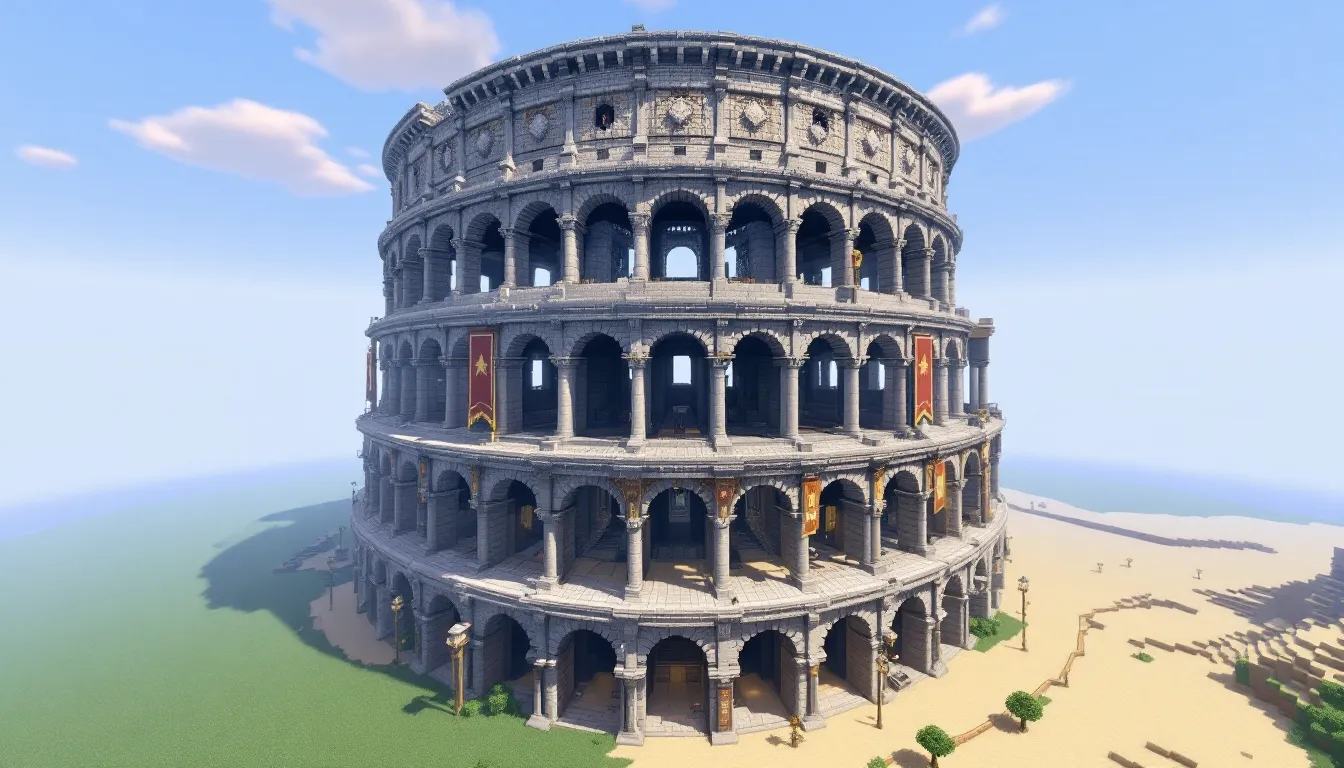
Few builds in Minecraft command the same presence as a towering colosseum. Whether you’re planning gladiator-style PvP battles, mob arena challenges, or just want a statement piece for your server, a well-executed colosseum brings ancient Rome right into your blocky world. The circular tiers, grand arches, and underground chambers create a spectacle that’s both functional and impressive.
But building a colosseum isn’t just about stacking stone blocks in a circle. You’ll need to nail the proportions, choose the right materials, and plan for both aesthetics and gameplay. This guide walks through every step, from foundation layout to redstone contraptions, with tips for survival and creative mode builders alike. By the end, you’ll have a colosseum that’s worthy of hosting epic arena battles and turning heads on any server.
Key Takeaways
- A Minecraft colosseum serves multiple purposes—from hosting PvP tournaments and mob arena challenges to functioning as a server centerpiece and creative building showcase that demonstrates advanced construction skills.
- Proper planning is essential: choose flat terrain, select a medium size (80–120 blocks diameter), use a 3–4 block material palette with stone bricks as your base, and gather 20,000+ blocks before starting the build.
- Build your Minecraft colosseum foundation symmetrically by marking a center point, constructing one quarter section first, then mirroring it three times to catch errors early and ensure visual consistency.
- Create iconic Roman arches using upside-down stairs, add depth with recessed arches and layered tiers, and incorporate 8–15 seating tiers with sectional dividers and access staircases to transform your arena into an authentic amphitheater.
- Redstone integration elevates your colosseum beyond decoration—wire entry gates, floor traps, mob spawners, and team spawn systems to support PvP game modes like Last Man Standing, King of the Hill, and Mob Gauntlets.
- In survival mode, break your colosseum project into three phases (preparation, foundation & walls, interior & details), farm materials efficiently using generators or community gathering, and expect 30–55 hours total for a medium-sized build.
Why Build a Colosseum in Minecraft?
A colosseum serves multiple purposes beyond just looking cool. It’s one of the most versatile mega-builds you can undertake.
PvP and Mini-Game Hosting: The arena floor provides a natural battleground for tournaments, duels, or custom game modes. Seating areas let spectators watch the action without interfering, and underground chambers can house spawn points, gear storage, or mob release mechanisms.
Server Centerpiece: On multiplayer servers, a colosseum becomes a community hub. Players gravitate toward impressive structures, and hosting regular events keeps your server population engaged. It’s also a statement piece that signals serious building chops.
Creative Challenge: Building a colosseum pushes your skills. The circular or oval shape requires planning and symmetry. Arches demand precision. Decorative elements like columns and statues test your attention to detail. It’s a project that’ll level up your building abilities.
Redstone Integration: Underground passages and arena mechanisms offer endless redstone possibilities. Trapdoors that drop mobs, hidden weapon dispensers, timed gates, a colosseum is the perfect playground for technical builds. You’ll combine aesthetic design with functional gameplay systems in ways few other structures allow.
Planning Your Minecraft Colosseum Build
Planning saves hours of rebuilding later. Before placing a single block, nail down the scale and palette.
Choosing the Right Location and Size
Flat Terrain Works Best: Look for plains, deserts, or flat-ish areas. Building on hills means extensive terraforming. If you’re committed to a specific biome for aesthetic reasons, be prepared to level ground or build support structures.
Size Matters for Functionality: A small colosseum (50-70 blocks diameter) works for solo or small group builds but feels cramped for events. Medium builds (80-120 blocks) hit the sweet spot, impressive without being overwhelming. Large colosseums (150+ blocks) are server showpieces but demand massive material investment and time.
Arena Floor Dimensions: The actual combat area should be at least 20×20 blocks minimum, though 30×30 or larger gives players room to maneuver. Remember that seating tiers and walls add significant diameter beyond the floor itself.
Selecting Materials and Block Palettes
Classic Roman Look: Stone bricks, cobblestone, and andesite form the base. Mix in polished variants for contrast. Stone brick stairs and slabs are essential for arches and seating. Spruce or oak trapdoors work for decorative grating.
Weathered Aesthetic: Combine regular stone bricks with cracked and mossy variants (roughly 70/20/10 ratio). Add cobblestone patches and stone brick slabs at different heights to simulate age. Andesite and diorite in small amounts break up monotony.
Material Quantities: A medium colosseum easily consumes 20,000+ blocks. In survival mode, set up a stone generator early or designate mining sessions. Gather at least:
- 15,000+ stone bricks (or equivalent)
- 3,000+ stairs and slabs
- 1,000+ cobblestone for foundations
- 500+ material for decorative accents
Color Palette Tip: Stick to 3-4 main blocks with 1-2 accent materials. Too many block types create visual noise. Test your palette in a small mockup before committing to the full build.
Step-by-Step: Building the Foundation and Outer Walls
The foundation determines whether your colosseum looks symmetrical or wonky. Take time here.
Laying Out the Circular or Oval Foundation
Use a Circle/Oval Generator: Tools like Plotz or in-game mods provide block-by-block templates. Input your desired diameter and it’ll map out each block placement. Screenshot the pattern or keep it open on a second monitor.
Mark the Center Point: Place a distinctive block (like glowstone) at the exact center. This anchor point ensures symmetry as you build outward.
Build in Quarters: Complete one quarter section of the circle first, then mirror it three times. This catches proportion errors early when they’re easier to fix.
Foundation Layer: Use cobblestone or a cheap material for the underground foundation (2-3 blocks deep). This won’t be visible but provides structural integrity and marks boundaries. The visible ground level starts above this.
Oval vs. Circle: True circles look more authentic to Roman architecture, but ovals work if your terrain or design demands it. Ovals are also slightly easier to build large-scale since the math is more forgiving on the long axis.
Constructing the Exterior Walls and Arches
Wall Height: Plan for 15-25 blocks tall on the exterior, depending on how many seating tiers you want. Taller walls create more dramatic presence but require more materials and scaffolding.
Arch Technique: Roman arches are the signature feature. Build them using stairs blocks:
- Mark archway width (5-7 blocks works well)
- Build straight pillars on each side up to arch height
- Use stairs placed upside-down to create the curved top
- Place full blocks at the apex for stability
- Repeat every 8-12 blocks around the perimeter
Layering Depth: Don’t build flat walls. Add depth by:
- Recessing arches 1-2 blocks inward
- Placing pillar sections that protrude outward
- Using slabs and stairs to create horizontal bands
- Adding buttresses every few arches for visual support
Upper Levels: Stack 2-3 tiers of arches, each slightly smaller than the one below. The top tier can be shorter or use columns instead of full arches for variety. This creates the iconic tiered Roman look.
Consistency Check: Walk the full perimeter regularly. One misplaced block ruins symmetry, and it’s easier to catch when the structure is partially complete rather than fully decorated.
Creating the Arena Floor and Underground Chambers
The arena floor is where gameplay happens. Functionality matters as much as looks here.
Designing the Arena Floor Layout
Floor Material: Sand is traditional for Roman arenas and allows for easy replacement after battles. Alternatively, use a mix of stone, gravel, and coarse dirt for a weathered pit look. Avoid grass, it looks too clean and gets destroyed during fights anyway.
Pattern and Zones: Break up the floor with subtle patterns using different materials. A center circle or crossed pathways add visual interest. In PvP builds, players published combat arena guides often recommend designating spawn zones in opposite quarters.
Elevation Changes: Slight height variations (1-2 blocks) create tactical advantages. Raised platforms, small walls, or sunken pits make combat more dynamic than a flat floor. Just keep it balanced so no spawn point has unfair advantage.
Drainage and Access: Build floor-level tunnels (2 blocks tall) leading from underground chambers to arena entrances. These serve as player and mob entry points. Add iron bars or gates that can be opened when battles begin.
Building Trapdoors, Dungeons, and Hidden Mechanisms
Underground Chamber Network: Excavate the area beneath the arena floor down 6-10 blocks. Create hallways connecting:
- Holding cells (5×5 rooms with iron bars)
- Gear storage rooms
- Redstone mechanism spaces
- Access tunnels to arena entrances
Trapdoor Mechanisms: These deliver mobs or surprises to the arena floor:
- Cut 2×2 or 3×3 holes in the arena floor
- Place trapdoors flush with the floor (closed position)
- Build a drop chute below leading to holding chambers
- Wire to lever or button for manual release, or pressure plate for automatic triggers
- Light the holding chamber well to prevent premature mob spawning
Hidden Weapon Dispensers: Place dispensers in walls at ground level, concealed behind trapdoors or paintings. Load with arrows, potions, or equipment. Wire to hidden buttons or pressure plates for mid-battle supply drops.
Spectator Safety: Make sure underground passages are completely separate from arena floor access. Last thing you want is spectators accidentally dropping into active combat zones. Use barriers or bedrock in creative mode to enforce boundaries.
Lighting: Keep underground areas well-lit to prevent hostile mob spawns in holding areas. Use torches, lanterns, or hidden glowstone. The arena floor itself can be darker for ambiance, but not so dark that it becomes a natural spawn zone between events.
Building Seating Tiers and Spectator Areas
Seating transforms your colosseum from a simple arena to an authentic amphitheater.
Tiered Stair Seating: Use stair blocks for seats, they’re literally made for this. Build in concentric rings stepping upward and inward. Each tier should be 3-4 blocks deep:
- Bottom row: stairs facing arena
- Middle section: slab or full block for foot space
- Back row: stairs for next tier up
This pattern repeats for each level. Aim for 8-15 tiers depending on your exterior wall height.
Section Dividers: Break the seating into sections with radial aisles (every 15-20 blocks). Build these aisles 2-3 blocks wide using slabs or full blocks. This adds realism and gives spectators clear access paths.
VIP Boxes: Reserve one section for premium seating. Build it as an enclosed balcony with walls, a roof overhang, and use fancier materials like quartz or prismarine. Add a few throne-style seats using stairs with banners behind them.
Standing Room: The top tier can be left as flat standing space instead of stairs. Roman colosseums had this for general admission crowds. It also gives you space to add decorative columns or statues along the upper rim.
Access Staircases: Build enclosed staircases inside the exterior walls connecting ground level to upper seating tiers. Make them wide enough (3 blocks) for smooth player movement. Place them at quarter points around the structure.
Safety Railings: Add fences, walls, or trapdoors along the front edge of the first seating tier. This prevents spectators from accidentally falling into the arena. It also visually separates the crowd from the action below.
Capacity Estimation: Each stair block seats one player (or villager NPC). A medium colosseum with 10 tiers and 100 blocks of circumference per tier holds roughly 1,000 spectators. Scale accordingly for your server population.
Adding Architectural Details and Decorations
Details separate a good build from a great one. This is where your colosseum gets character.
Columns, Statues, and Ornamental Features
Exterior Columns: Place columns between arches using your primary building material. Make them 2×2 or 3×3 at the base. Add capital details at the top using slabs and stairs to create the appearance of Doric or Corinthian style.
Entry Pillars: Frame main entrance arches with taller, more ornate columns (4×4 base). Build them 5-10 blocks taller than surrounding structure. Top with decorative capitals using blocks like quartz stairs or stone brick slabs arranged in protruding patterns.
Statues and Sculptures: Create 5-10 block tall statues positioned:
- At main entrances facing outward
- On the upper rim between seating sections
- In VIP box areas
Use a mix of quartz, concrete, or terracotta for skin tones. Keep designs simple, detailed sculptures are tough in Minecraft’s blocky medium. Stylized or abstract forms often look better than attempts at realism.
Cornices and Trim: Add horizontal detail lines running around the exterior using upside-down stairs or slab layers. These breaks in the wall surface add architectural complexity. Place them at floor level divisions between seating tiers.
Weathering Effects: Strategically replace 5-10% of stone bricks with cracked or mossy variants. Add andesite or cobblestone patches like damaged sections have been repaired over centuries. Place vines growing down from upper levels in corners and shaded arches.
Banners, Flags, and Custom Lighting
Banner Designs: Create faction or house banners using a loom. Hang them:
- From the upper rim overhanging seating areas
- Along exterior walls between arches
- In VIP boxes and entrance tunnels
Use bold, simple patterns. Alternate 2-3 colors for visual variety but maintain a cohesive theme.
Flag Poles: Build tall flag posts (10-15 blocks) on the upper rim using fences. Top with banners that flutter. Space them evenly around the perimeter or cluster at cardinal directions.
Lighting Strategy: Balance ambiance with functionality:
- Seating areas: Lanterns or sea lanterns placed every 8-10 blocks along aisles
- Arena floor: Fewer lights for drama, maybe just torches around the perimeter or glowstone hidden under grates
- Exterior: Lanterns on columns or hidden glowstone behind arches for nighttime illumination
- Underground: Full lighting to prevent mob spawns
Glowstone Tricks: Hide glowstone behind trapdoors, under carpets, or within wall cavities for indirect lighting. This maintains medieval aesthetic while preventing hostile spawns.
Custom Touches: Add market stalls or vendor booths outside the main entrance. Build a few surrounding structures like smaller temples or administrative buildings to create a complex rather than just a standalone colosseum. These touches make it feel like part of a living city.
Advanced Features: Redstone Contraptions and Mini-Games
Redstone integration transforms your colosseum from decorative build to functional game space.
Installing Gates, Traps, and Mob Spawners
Entry Gates: Build piston doors at arena entrance tunnels:
- Create a 3-wide, 3-tall doorway
- Place sticky pistons facing the opening on both sides
- Attach blocks to piston faces
- Wire to lever in an announcer’s booth or button in underground control room
- When activated, pistons extend and seal the entrance
This contains players/mobs during events and adds spectacle to battle starts.
Floor Traps: Diversify arena combat with hazards:
- Pit Traps: 3×3 areas where pistons retract floor blocks, dropping fighters into spike pits or lava (in creative) beneath. Wire to randomized clock circuits for unpredictability.
- Arrow Traps: Dispensers hidden in walls loaded with arrows, triggered by pressure plates or tripwires across the arena floor.
- Potion Dispensers: Load with splash potions of harming, poison, or slowness. Place on randomized timers.
Mob Spawner Integration: You can’t move natural spawners, but you can build mob delivery systems:
- Create dark spawn chambers underground (9×9 rooms, no light)
- Use water flows to push spawned mobs toward collection points
- Build vertical drop chutes (21+ blocks for fall damage) or water elevators leading to arena floor trapdoors
- Control release with piston gates
Note: This requires the area to be within your active chunks and properly dark. Many modded game modifications include spawner manipulation tools if you want more control.
Scoreboard Systems: Use command blocks and scoreboards to track kills, deaths, and wins if you’re running on a server with operator permissions. Display stats on banner-style signage or in a dedicated spectator area.
Setting Up PvP Arenas and Custom Game Modes
Team Spawn Points: Designate opposite sides of the arena as red/blue team spawns. Use colored concrete or banners to mark territories. Build small protected spawn rooms with gear chests that teams can access at match start.
Gear Balancing: Stock spawn chests with identical loadouts:
- Iron or diamond armor sets
- Weapons (sword + bow with 32-64 arrows)
- Food (golden apples or steak)
- Utility (ender pearls, potions, blocks for building)
Identical gear ensures skill-based outcomes rather than gear advantage wins.
Game Mode Ideas:
Last Man Standing: Classic deathmatch. Last player alive wins. Use regeneration reduction or no natural regen for faster-paced battles.
Mob Gauntlet: Solo or team survival against waves of increasingly difficult mobs released from underground chambers. Track how many waves players survive.
Capture the Flag: Place flag (banner) at each team’s spawn. First to capture and return opponent’s flag wins. Build accessible routes but include height variation for tactical play.
King of the Hill: Build a raised platform at arena center (5×5, 3 blocks high). Players must stand on it for 60 continuous seconds to win. Defending from elevation advantage versus attackers trying to dislodge them.
Redstone Timer System: Build a central clock using repeaters to count down match duration. Connect to note blocks that play sounds at intervals (5 min, 1 min, 30 sec warnings). Wire a final alert that opens exit gates or triggers fireworks to signal match end.
Spectator Mode Controls: If running in creative or with operator status, set up a command block system that puts eliminated players into spectator mode. They can watch remaining fighters without interfering. Saves having eliminated players awkwardly standing around or leaving.
Colosseum Build Ideas and Variations
The classic Roman design is just the starting point. Different themes completely change the vibe.
Roman-Style Classic Colosseum
Material Palette: Stone bricks, cobblestone, and andesite with oak or spruce wood accents. Stick to earth tones.
Signature Features:
- Tiered exterior with stacked arches (3 levels minimum)
- Sand or dirt arena floor
- Circular or oval shape (historical Roman Colosseum was actually oval)
- Underground hypogeum chambers
- Weathering with cracked and mossy variants
- Banner decorations in red, gold, or purple
Scale Reference: The real Colosseum is roughly 189×156 meters. In Minecraft, a 150×120 block build captures similar proportions at reduced scale. For more manageable projects, 80-100 blocks diameter still reads as authentically Roman.
Surrounding Context: Add Roman roads (stone bricks with stone brick slab borders), nearby temples, or market stalls. This places your colosseum in a broader Roman city context.
Fantasy and Nether-Themed Arenas
Nether Colosseum: Build in the Nether dimension or use Nether materials:
- Palette: Blackstone, polished blackstone bricks, nether bricks, crying obsidian accents
- Arena Floor: Netherrack, soul sand, or magma blocks (carefully, magma damages players)
- Lighting: Lava flows behind iron bar grates, soul lanterns, shroomlight clusters
- Hazards: Actual lava pits around arena edges, ghast spawn chambers, wither skeleton opponents
Fantasy Arena: Medieval meets magic:
- Palette: Mix stone bricks with purple or cyan terracotta, prismarine, or purpur blocks
- Arena Floor: End stone, mycelium, or custom pattern using glazed terracotta
- Decorative Elements: Dragon heads mounted on walls, end rods as spires, sea lanterns for mystical lighting
- Special Features: Ender pearl teleportation pads, enchanting tables in prep rooms, potion brewing stands for spectators
Many builders share unique creative arena concepts that blend multiple themes for truly one-of-a-kind designs.
Modern Stadium and Futuristic Designs
Modern Sports Stadium:
- Palette: Concrete (white, light gray, black), glass, iron bars, quartz
- Seating: Individual colored concrete seats arranged in team color sections
- Arena Floor: Grass blocks with white concrete lanes marking boundaries, or colored concrete courts
- Lighting: Redstone lamps on tall posts around the rim, sea lanterns in ceiling if domed
- Screens: Build jumbo-tron style screens using black and white concrete patterns
- Roof: Glass dome or concrete overhang sections covering parts of seating
Futuristic Arena:
- Palette: Quartz, white/cyan/light blue concrete, sea lanterns, prismarine
- Shape: Can break from circular tradition, hexagonal or even multi-level platforms
- Arena Floor: Prismatic patterns, light-up floor sections using sea lanterns under white or cyan glass
- Features: Teleportation pads, energy shield effects (vertical water streams or beacon beams), hologram-style signs using armor stands
- Tech Integration: Heavy redstone with command blocks for automated systems, scoreboards, and special effects
Hybrid Approach: Combine classical architecture with modern materials. Stone brick structure with concrete seating and modern lighting creates a renovated historical venue look.
Tips for Building in Survival vs. Creative Mode
Mode choice drastically changes your approach and timeline.
Creative Mode Advantages:
- Unlimited materials eliminate grinding
- Flight makes building upper levels and symmetry checks easy
- Instant placement speeds construction
- Experimentation costs nothing, tear down and rebuild sections freely
- Access to barrier blocks for invisible boundaries
- Can use structure blocks to copy/paste symmetrical sections
Creative Mode Strategy: Build a test version first at reduced scale (50% size). Work out proportions, test redstone circuits, and finalize decoration schemes. Then scale up to final dimensions with confidence.
Survival Mode Challenges:
- Material gathering is the real timesink (15-20+ hours for medium builds)
- Scaffolding required for upper sections (bring tons of bamboo or ladders)
- Hostile mobs during night construction
- Fall damage risk, bring water buckets
- Resource investment makes mistakes costly
Survival Mode Strategy:
Phase 1 – Preparation (5-10 hours):
- Set up stone generator or efficient mining operation
- Build temporary smelting array (6-8 furnaces minimum)
- Stockpile food and basic tools
- Gather wood for scaffolding
- Create material storage system near build site
Phase 2 – Foundation & Walls (15-25 hours):
- Mark foundation outline completely before building upward
- Build one complete vertical section (ground to top) first to test design
- Construct external scaffolding on perimeter for safe access
- Work in daylight or light up work areas heavily
- Keep a bed nearby to set spawn and skip nights
Phase 3 – Interior & Details (10-20 hours):
- Arena floor and seating
- Underground chambers (safest from mob interference)
- Decorative elements last, functional structure first
Survival Building Tips:
- Bring shulker boxes (if available) loaded with materials to work site rather than making constant storage runs
- Mark symmetry points with torches or wool blocks you can see at distance
- Build in chunks: Complete outer walls first, then seating, then decoration. Finish one section completely before moving to the next.
- Efficiency enchantments: Efficiency IV+ pickaxe and fortune III for material gathering make massive difference
- Elytra changes everything: If you have access to elytra and rockets, upper level construction becomes nearly as fast as creative mode
Material Farming Shortcut: If you’re on a server, organize a community project. Multiple players gathering materials simultaneously cuts survival build time by 60-70%. Plus, it builds hype for the eventual arena events.
Hybrid Approach: Some players build the structure in creative on a test world, then challenge themselves to recreate it in survival. You’ve already solved design problems, so survival becomes pure execution.
Conclusion
Building a minecraft colosseum is one of those projects that seems intimidating at first glance but breaks down into manageable steps. Foundation, walls, seating, details, tackle each phase systematically and you’ll watch your arena take shape block by block. Whether you’re going for Roman authenticity or a Nether-themed nightmare arena, the core principles stay the same: plan your scale, maintain symmetry, and layer in details that serve both form and function.
The real payoff comes when you host your first event. Watching players battle in the arena you built, surrounded by spectators in the seats you placed, makes every hour of construction worth it. And the best part? A colosseum is never truly finished. You can always add new redstone contraptions, expand underground chambers, or theme it for seasonal events. It’s a build that grows with your skills and keeps your server engaged for months.
So mark that center point, gather your materials, and start laying that foundation. Your minecraft colosseum awaits.